How to use an equalizer with AirPods on a Mac
Checked on 21 November 2026 with macOS 27.0.1 and SoundMarshal 1.0.
Newer AirPods have an equalizer on the Mac: in System Settings, click your AirPods, then Audio & Routing. Our free app, SoundMarshal, adds an equalizer with ten sliders, for older AirPods and other headphones too.
In System Settings
AirPods 4 or later, AirPods Pro 2 or later and AirPods Max 2 have an equalizer with three sliders.
With your AirPods on and connected, choose Apple menu > System Settings, then click their name in the sidebar. Click Audio & Routing, click Equalizer, then click Custom. Drag the Low, Mid and High sliders up or down.
The setting is stored on the AirPods and carries over to your other paired devices. To turn it off, choose Recommended instead of Custom.
If you have newer AirPods and three sliders are enough, you need nothing else. Older AirPods and other headphones have no equalizer in System Settings.
In the Music app
The Music app has an equalizer that works with older AirPods too. Choose Window > Equalizer, pick a preset from the pop-up menu, then select On. It changes only what Music plays, so it’s enough if Music is all you listen to.
With SoundMarshal
SoundMarshal is free. It needs macOS 27 or later and a Mac with Apple Silicon.
- Download SoundMarshal, open the downloaded file and drag the app to Applications.
- Open the app, click Agree to accept its License Agreement, then click Continue. When macOS asks for permission, click Allow. macOS calls this recording: SoundMarshal changes your sound as it plays, and no sound leaves your Mac.
If you clicked Don’t Allow, click Open System Audio Settings in SoundMarshal’s window and turn SoundMarshal on.
- Play something through your AirPods. Click the horse in the menu bar to open the app’s window, then click Equalizer at the top. If the horse is hidden, open the app from Applications again.
- Click a preset in the list on the left to hear it. Then drag the sliders under Bands to change it. Each slider changes one range of sound: deep bass on the left, treble on the right. Up makes that range louder.
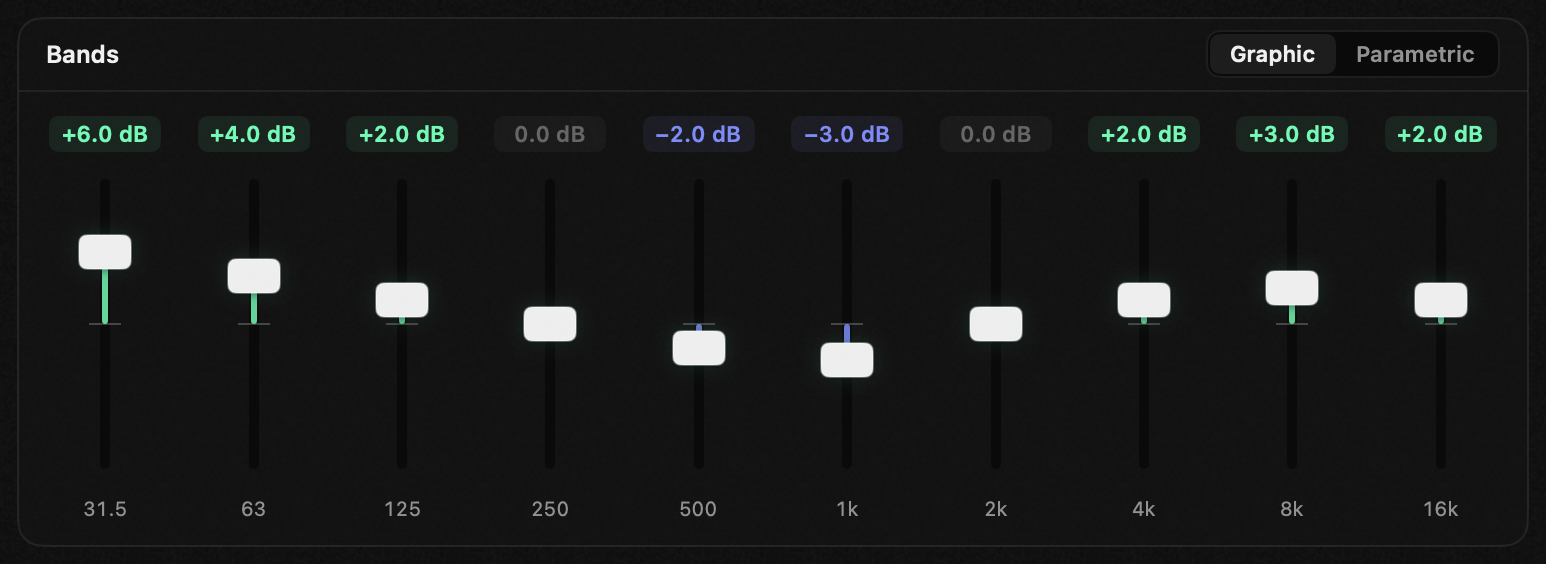
- Your changes show as a copy, such as “Flat, edited”. To keep them, click Save As… and name the preset.
SoundMarshal puts your preset back whenever the AirPods play on this Mac. Your speakers play it too, until you choose one for them: our headphones and speakers guide shows how. After you quit SoundMarshal, your sound plays unchanged until you open the app again.
If you chose Custom in System Settings or turned on Music’s equalizer, they change the sound on top of SoundMarshal’s. To hear only SoundMarshal’s, choose Recommended in System Settings and turn Music’s off.
When an app uses your AirPods’ microphone, as in a call, your sound plays without SoundMarshal’s equalizer. It comes back when no app uses that microphone, usually when the call ends. To keep it during calls, choose another microphone in the calling app.
